How to Do M-Pesa Integration on Your Website (Step-by-Step 2026 Guide)
A detailed technical guide to M-Pesa integration using Safaricom's Daraja API — STK Push, callbacks, security, and reconciliation, explained step by step.
How to Do M-Pesa Integration on Your Website (A Detailed Guide)
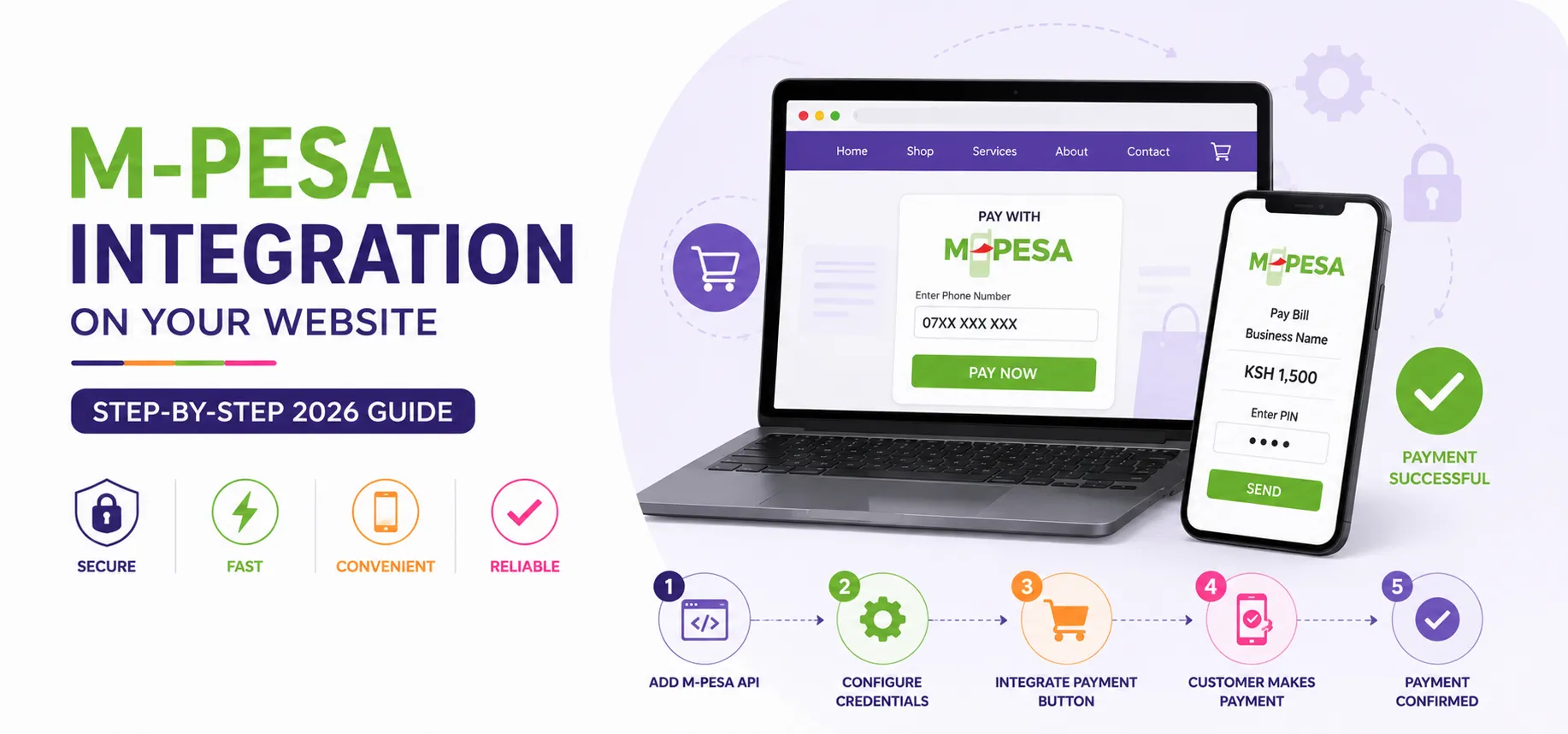
If you're running an online store, booking platform, or SaaS product targeting Kenyan customers, M-Pesa isn't optional — it's the payment method your customers expect. This guide walks through exactly how M-Pesa integration works, the options available, and the practical steps to get it running on your site.
Understanding Your M-Pesa Integration Options
Safaricom's Daraja API is the official gateway for integrating M-Pesa into your website or app. Within Daraja, there are several APIs depending on what you need.
M-Pesa Express (STK Push) pushes a payment prompt directly to the customer's phone during checkout. This is the most common choice for e-commerce and the smoothest customer experience.
C2B (Customer to Business) lets customers pay via your Paybill or Till number manually, and your system receives a callback confirming payment.
B2C (Business to Customer) is for sending money out, such as refunds, payouts, or salaries.
Transaction Status and Account Balance APIs let you check payment status and your M-Pesa account balance programmatically.
For most websites collecting payments from customers, STK Push (Lipa na M-Pesa Online) is what you want.
Step 1: Register for a Daraja Account
Go to the Safaricom Developer Portal (developer.safaricom.co.ke) and create an account. Create a new app in the sandbox environment — this gives you a Consumer Key and Consumer Secret, which you'll use to authenticate API requests. Test thoroughly in the sandbox before applying for Go-Live credentials, which require submitting your business details, Paybill/Till number, and callback URLs for Safaricom's review.
Step 2: Get Your Business Short Code and Credentials
To go live, you'll need a registered Paybill or Till Number (apply through Safaricom or your bank if you don't already have one), your Business Short Code, a Passkey provided by Safaricom for generating secure request passwords, and production Consumer Key and Secret.
Step 3: Authenticate with the Daraja API
Every request to Daraja starts with generating an OAuth access token:
GET https://api.safaricom.co.ke/oauth/v1/generate?grant_type=client_credentials
Authorization: Basic base64(ConsumerKey:ConsumerSecret)
This returns an access token valid for about an hour, which you'll attach to subsequent API calls.
Step 4: Trigger an STK Push at Checkout
When a customer clicks "Pay with M-Pesa," your backend sends a request like this:
POST https://api.safaricom.co.ke/mpesa/stkpush/v1/processrequest
{
"BusinessShortCode": "174379",
"Password": "base64(ShortCode+Passkey+Timestamp)",
"Timestamp": "20260704101530",
"TransactionType": "CustomerPayBillOnline",
"Amount": "1000",
"PartyA": "2547XXXXXXXX",
"PartyB": "174379",
"PhoneNumber": "2547XXXXXXXX",
"CallBackURL": "https://yourdomain.com/mpesa/callback",
"AccountReference": "Order12345",
"TransactionDesc": "Payment for Order 12345"
}
The customer receives a prompt on their phone to enter their M-Pesa PIN and confirm payment.
Step 5: Handle the Callback
Safaricom sends a callback (webhook) to the CallBackURL you specified, confirming whether the payment succeeded or failed. Your server needs an endpoint to receive and validate the callback payload, extract the MpesaReceiptNumber, amount, phone number, and transaction date, update your order or invoice status in your database, and trigger any follow-up actions such as sending a receipt, releasing digital goods, or updating stock.
Important: Never rely on the customer's browser redirect alone to confirm payment — always confirm via the server-to-server callback, since customers can close the browser before a redirect fires.
Step 6: Handle Edge Cases
A production-ready integration needs to account for timeouts, where customers don't respond to the STK prompt in time; failed or cancelled payments, where the customer enters the wrong PIN or cancels; duplicate callbacks, since Safaricom may retry callbacks and your system should be idempotent so a transaction is only processed once even if the callback arrives twice; and network delays, which you can handle by building in a "checking payment status" polling mechanism using the Transaction Status API as a fallback.
Step 7: Security Best Practices
Never expose your Consumer Secret or Passkey in frontend code — all API calls must happen server-side.
Validate that callbacks are genuinely coming from Safaricom's IP ranges where possible.
Log all transactions with timestamps for reconciliation and dispute resolution.
Use HTTPS everywhere, especially for your callback URL.
Step 8: Reconciliation
Once live, you'll want a way to reconcile M-Pesa transactions against your sales records automatically rather than manually checking statements. This is where connecting your M-Pesa integration to your accounting or ERP system pays off — payments get matched to invoices automatically, and discrepancies get flagged without anyone combing through SMS notifications.
Common Mistakes to Avoid
Going live without sandbox testing — sandbox testing catches most integration bugs before they cost you real transactions.
Not handling callback failures gracefully — if your callback endpoint goes down even briefly, you risk losing track of confirmed payments.
Hardcoding phone number formats — always normalize numbers to the 2547XXXXXXXX format before sending requests.
Ignoring the Go-Live application timeline — Safaricom's review process can take time, so start it early if you're working toward a launch date.
Final Thoughts
M-Pesa integration isn't just a technical checkbox — done well, it removes friction at the exact moment a customer is ready to pay, which directly affects your conversion rate. Done poorly (failed callbacks, unclear error states, mismatched reconciliation), it creates support headaches and lost revenue.
At Timesten Technologies, M-Pesa and payment gateway integration is one of our core services — we've built it into RentSmart for rent collection, Clasyo for school fees, SuperShop for B2B orders, and custom client websites. If you need M-Pesa working reliably on your platform, we can handle the integration end-to-end.
Get in touch: timestentechnologies.co.ke | WhatsApp: 0795 155 230
Other Blogs
Contact Us
Ready to take your business to the next level? Reach out to Timesten Technologies today. Whether you have a question, need more information about our services, or are ready to start a project, we're here to help. Connect with us, and let's discuss how we can work together to achieve your goals. Your success is just a message away!
our partners